Table of Contents
What is a Tune Set Signature?
In traditional Irish and folk music sessions, tunes are rarely played in isolation. Instead, musicians string together two, three, or four tunes to build momentum, contrast keys, and create a satisfying narrative flow. Over time, certain tune sequences become so established in the community that they are treated as standard repertoires.
A **Set Signature** is a unique, ordered sequence of tunes played together — such as The Tarbolton ? The Longford Collector ? The Sailor's Bonnet.
The **Set Signatures Explorer** analyzes more than 110,000 sets uploaded by community members to TheSession.org. It groups identical tune sequences, measures how frequently they are reused, and visualizes them in a dynamic bubble chart. This allows players to see at a glance which tune combinations are the most widely played and how they transition.
The Anatomy of a Bubble (Pairs, Triples & Quads)
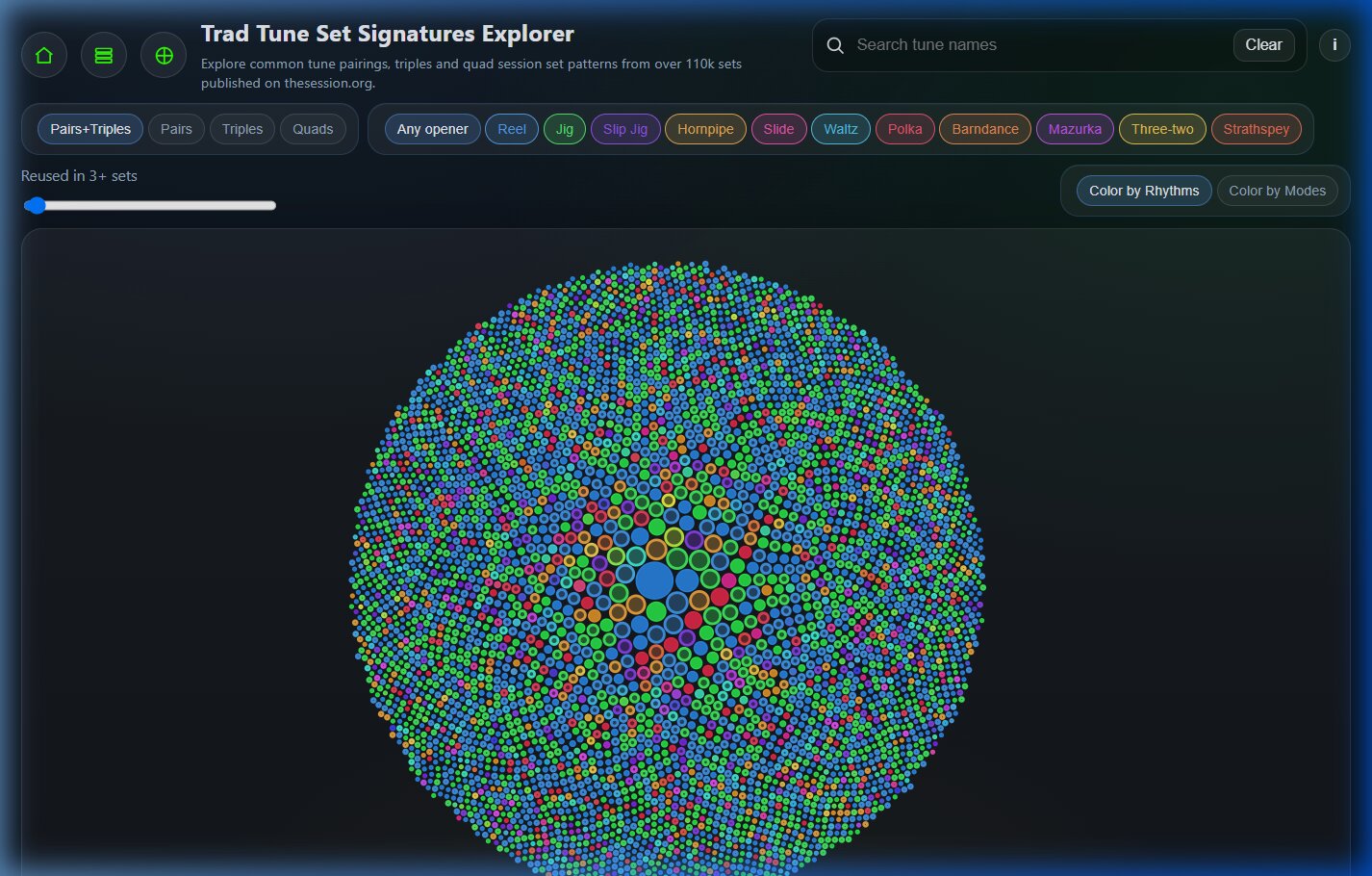
Each circle or bubble on the chart represents a specific set signature. The visual design tells you three critical pieces of information about the set's size, popularity, and length:
- Bubble Size: The scale of each bubble corresponds to its popularity (reuse count). Larger bubbles indicate sets that have been entered multiple times by different users, representing community favorites.
- Hollow Centers (Pairs): Two-tune sets (Pairs) are rendered as semi-transparent/hollow circles (fill opacity is set to 35%) with a thick border (2.5px). This open visual design instantly distinguishes them from longer sets.
- Solid Centers (Triplets): Three-tune sets (Triplets) are filled in as solid circles (opacity 90%) with a thin border (1.25px). They form the dense core of the default view.
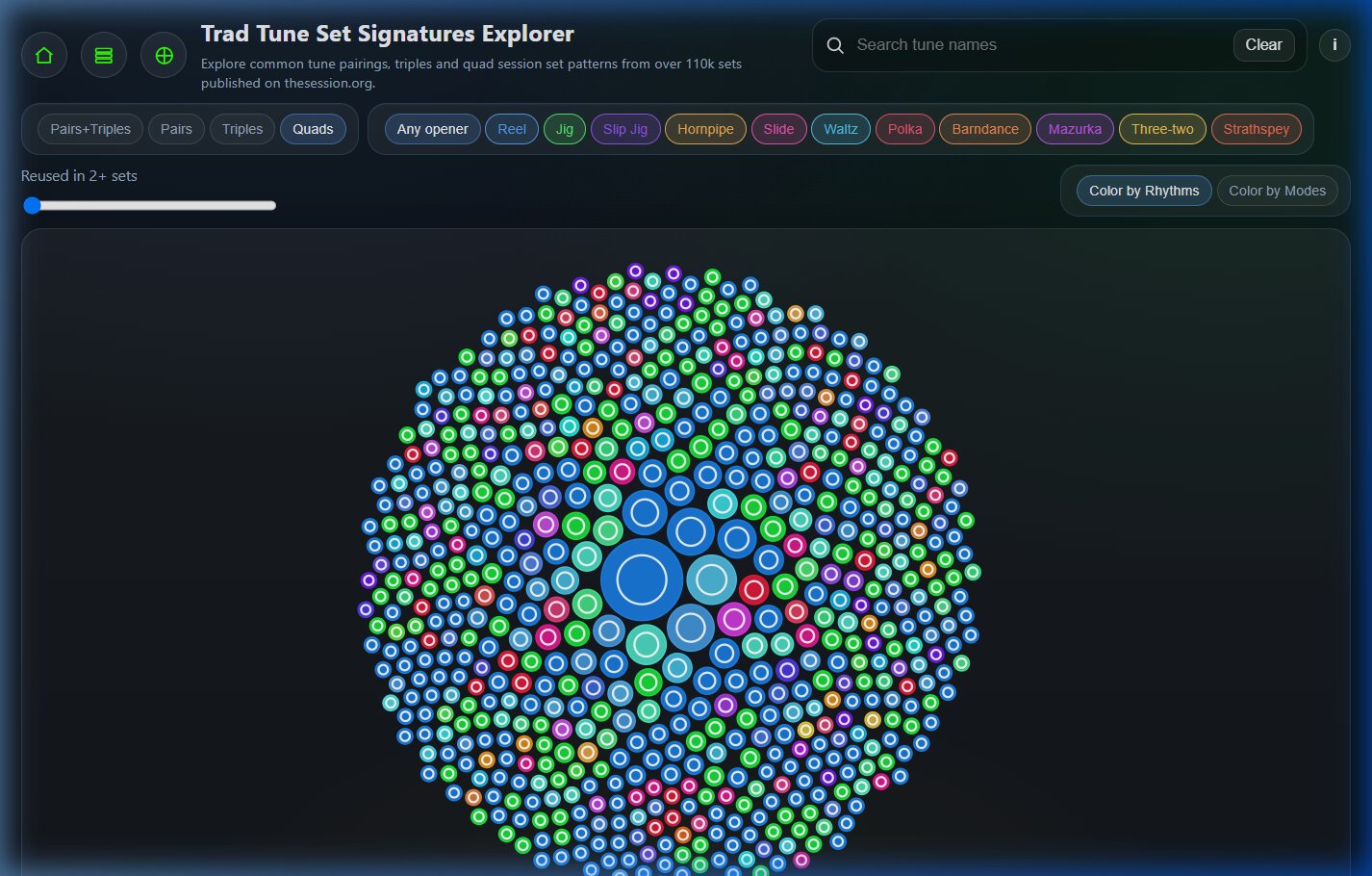
- Nested Rings (Quads): Four-tune sets (Quads) are rendered as solid filled bubbles with a clean, centered inner white ring (border width 2px, radius set to 60% of the bubble's size). This ring draws your eye directly to these extended combinations.
Understanding the Visual Color Coding
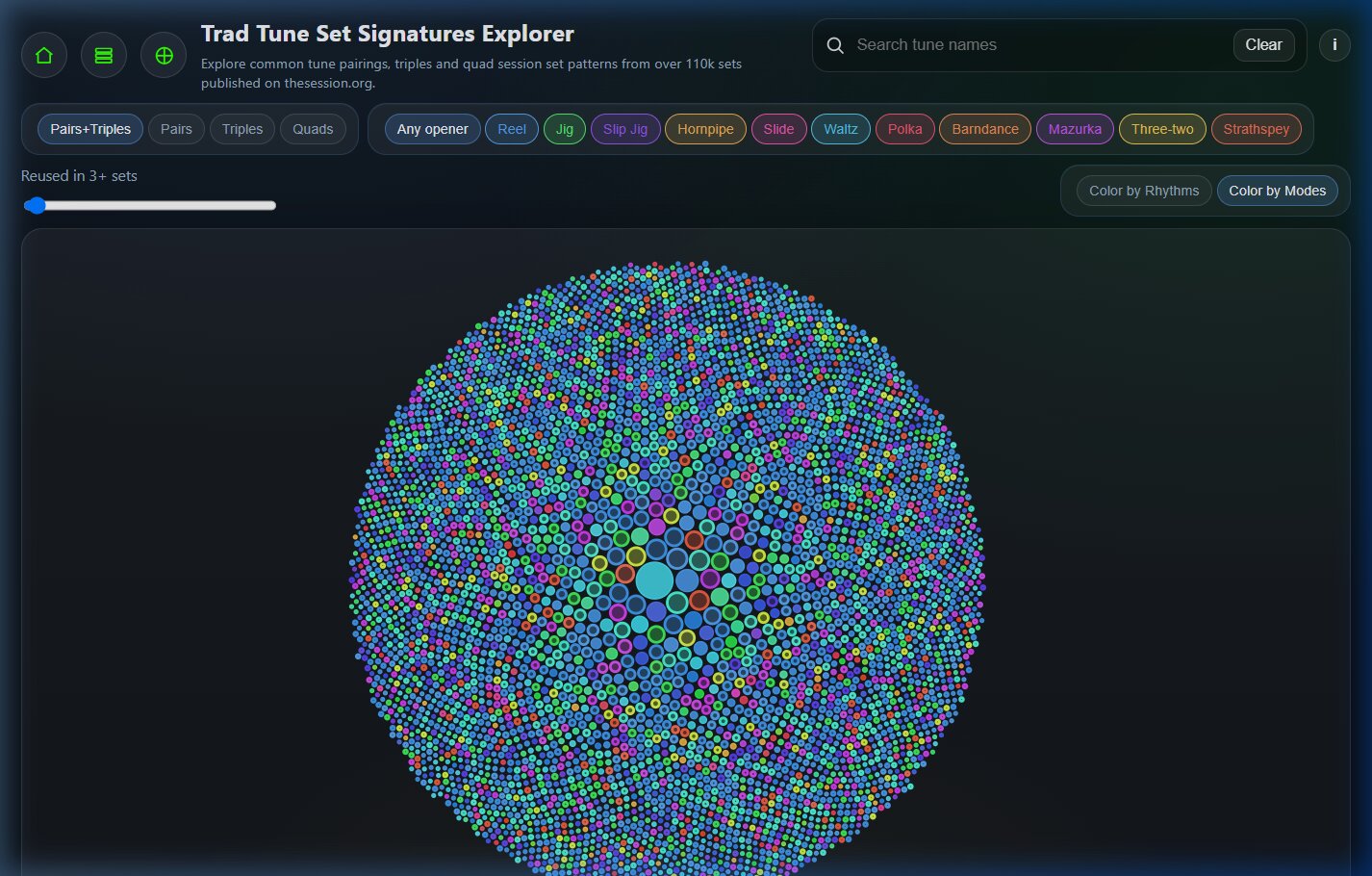
The coloring of the bubbles represents the key or rhythm pattern of the set. Depending on whether you have selected **Color by Rhythms** or **Color by Modes**, the tool applies a visual color palette to represent transitions:
1. Pure Sets (Uniform Rhythms or Modes)
When a set consists of tunes that all share the exact same rhythm type (e.g., Reel → Reel → Reel) or key signature family (e.g., Major → Major), the bubble receives a single, solid color matching that family.
Rhythm: Reels (Blue)
Pure reel sets are colored a bright slate blue.
Rhythm: Jigs (Green)
Pure jig sets are represented in emerald green.
Rhythm: Hornpipes (Orange)
Pure hornpipe combinations appear in amber/orange.
Rhythm: Polkas (Red)
Pure polkas display in crimson red.
Mode: Major Keys (Blue)
Sets containing only Major-key tunes (e.g., G Major → D Major) are colored Blue.
Mode: Dorian Keys (Green)
Sets that are entirely Dorian (e.g., E Dorian → A Dorian) are colored Green.
Mode: Minor Keys (Red)
Sets in natural or minor modes appear in warm Red/Orange.
Mode: Mixolydian Keys (Purple)
Pure Mixolydian combinations appear in deep Purple.
2. Mixed/Hybrid Sets (Color Blending)
What happens when a set blends different rhythm structures or modes? For example, a set starting with a **Reel (Blue)** and transitioning to a **Jig (Green)**?
Instead of choosing one rhythm over the other, the Explorer blends the colors together on the color wheel.
A Reel-to-Jig mixed set blends into a distinct **Teal/Cyan** shade. A set transitioning from a **Major key (Blue)** to a **Mixolydian key (Purple)** blends into an **Indigo/Violet** color.
This color blending gives players a quick visual shortcut: solid, uniform bubbles mean the set stays in one key or rhythm, while blended/hybrid colors signal transitions and key shifts.
A Tour of the Filter Toggle Switches
To help navigate the thousands of sets in the database, the page provides several interactive filters and toggles in the header:
1. Signature Length Toggle
Located in the first filter section, this lets you choose the size of the sets you are studying:
- Pairs+Triples: The default view, displaying both 2-tune and 3-tune sets together.
- Pairs: Limits the view to only hollow, double-tune sets.
- Triples: Shows only solid, triple-tune sets.
- Quads: Loads the four-tune dataset (with inner white rings).
2. Opener Rhythm Filter
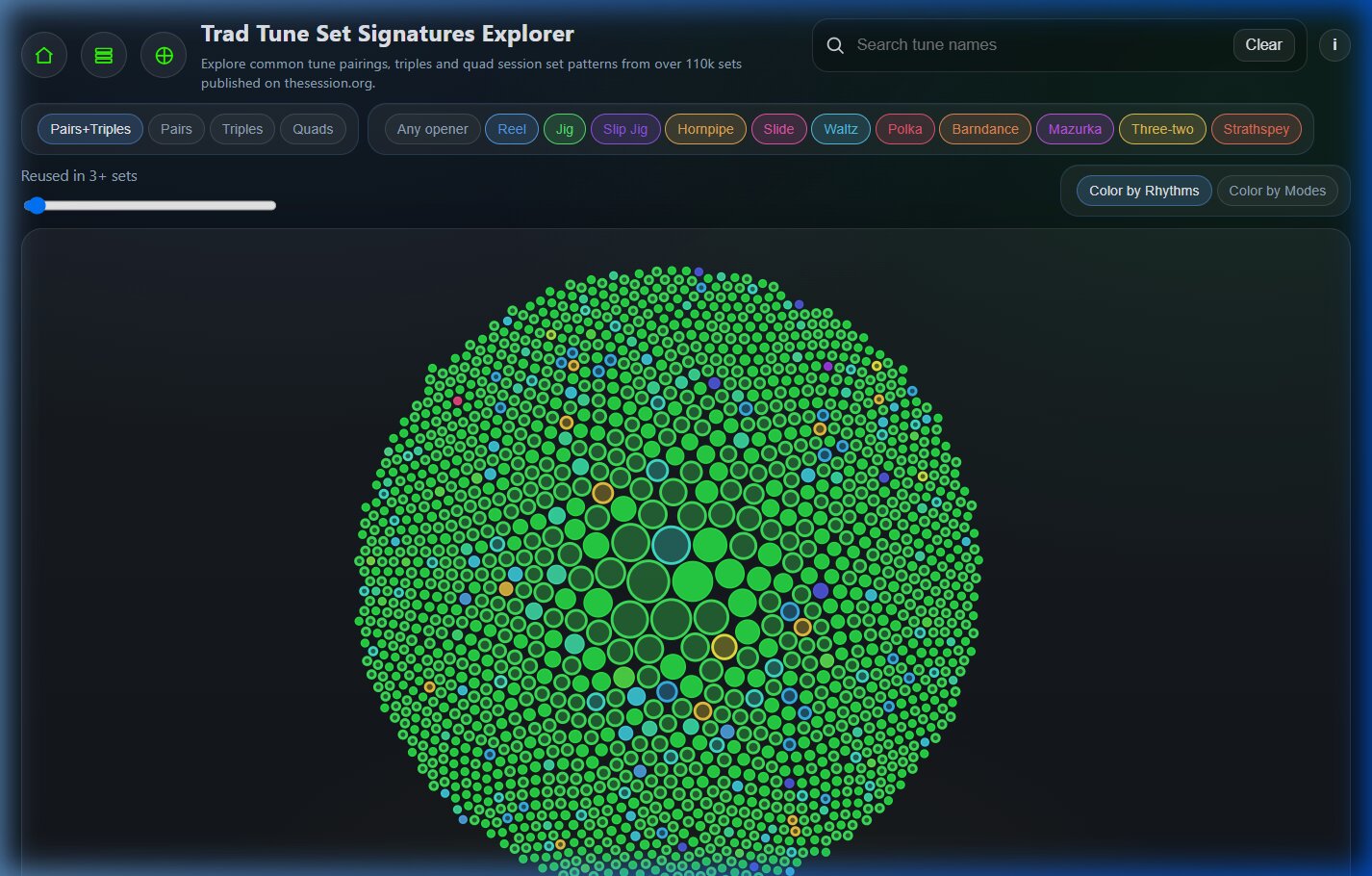
Narrow down your visualization by selecting the rhythm of the starting tune. For example, clicking **Jig** hides all reel or hornpipe sets, letting you focus entirely on combinations that start with a jig (ideal for planning jig sets).
3. Minimum Reuses Slider
This range slider filters out rare or accidental user set lists. Slide it to 5+ or 10+ to reveal the most widely played, rock-solid session sets. Under "Pairs+Triples," setting the threshold to 15+ isolates the absolute staples of Irish session music.
4. Color Coding Toggle (Color by Rhythms vs. Color by Modes)
This is one of the most useful features for set planners. It allows you to instantly swap the visual color coding of the bubble chart between two different musical perspectives:
- Color by Rhythms (Default): This mode colors the bubbles based on the rhythms of the tunes in the set. It helps you quickly spot sets that maintain a consistent rhythm (pure blue for reels, pure green for jigs) versus sets that transition between rhythms (like a jig shifting into a reel, which appears as a blended teal bubble). This is highly useful for managing the tempo and groove pacing of your sets.
- Color by Modes: This mode switches the colors to show the keys/modes of the tunes (Major, Dorian, Minor, or Mixolydian). It allows you to visually study key changes. You can easily find sets that stay in a single key family, or identify transition patterns — such as sets that start in a moody E Minor or E Dorian key and shift to a bright G Major key (appearing as hybrid green-blue or red-blue gradients).
Musical Case Studies: Classic Set Signatures
Let's look at how two famous traditional sets appear within the Set Signatures Explorer.
In the default view, this is one of the largest solid blue bubbles. In the **Color by Modes** view, this bubble is a hybrid indigo hue. E Dorian (Green/130), G Major (Blue/210), and D Major (Blue/210) average out to a blue-green color. This visual representation signals a smooth transition from a minor/Dorian modal sound into bright, uplifting major keys.
This set appears as a large hollow bubble. Because both are Jigs, it is a pure green bubble under the **Color by Rhythms** toggle. When switching to **Color by Modes**, G Major (Blue/210) and E Dorian (Green/130) fuse on the HSL wheel to form a distinct Teal bubble, indicating a key relationship based on relative keys (G Major shares the same key signature as E Dorian).
Why This is Useful for Musicians
Whether you are arranging music for a band, leading a local session, or learning your first tune pairings, the Set Signatures Explorer serves several practical needs:
- Arranging Playable Transitions: Awkward transitions can ruin the momentum of a set. By searching for a tune in the Explorer, you can see what tunes are most commonly paired with it. If dozens of musicians play a transition, you can be sure the key shift and tempo change feel natural.
- Key and Modal Insights: Using the **Color by Modes** view helps you study the aesthetics of key changes. You can visually identify if sets tend to stay in the same key (monochromatic clusters) or shift keys to create lift (gradient clusters).
- Repertoire Expansion: If you already know a tune like The Wind That Shakes the Barley, you can search for it in the Explorer to find matching pairs or triples. This helps you target your practice checklist to tunes that link up with what you already know.
- Practice with the Setlist Player: Clicking any bubble opens a detailed side panel. From there, you can click the set's title link to open the interactive **Setlist Player**. This page renders sheet music, generates synthesized MIDI audio, and lets you play and practice along with the full set at any speed.
Frequently Asked Questions
How do I search for a specific tune set?
Use the search box in the top-right header. Type in the name of a tune, and the bubble chart will instantly filter to only display bubbles representing sets that contain that tune.
What does it mean if a bubble is isolated from the rest?
The bubble chart utilizes a D3 packing layout which packs circles as tightly as possible based on their counts. Isolated bubbles are often smaller sets with lower reuse counts, while the central clusters represent the most common core repertoire.
What does the "Open Tune Tree" button do in the details card?
Clicking "Open Tune Tree" opens the **Bidirectional Transition Tree** for the first tune in that set. This tree lets you visualize all the tunes that are played *before* or *after* that tune in various sets, providing a wider web of transition paths.
Can I download the sheet music for these sets?
Yes. When you click a bubble and use the details link to open the set in the Setlist Player, the player provides buttons to view, print, or download the notation in PDF, ABC, or MIDI format.